Frequently asked questions
Simple answers about using the Vertical app. Tap any question to see the answer. Still have a question? Email us and a real person will help.
Getting started
What is Vertical?
Vertical is a phone app that helps you eat at the right times for your training. You write down what you eat, and the app tells you whether you have enough energy for your next workout or practice, and what to eat next if you don’t.
How do I get the app on my iPhone?
Right now Vertical is installed through TestFlight, a free Apple app for trying new apps. Your coach or gym will give you a link and an invite code.
- Open the App Store and install the free app called “TestFlight”.
- Open the Vertical link your coach or gym sent you.
- Tap “Install” to put Vertical on your phone.
- Open Vertical, create your account, and enter your invite code.
Do I need a coach to use Vertical?
Most people join through a coach, gym, or team, who gives them an invite code. If you don’t have one, email us and we will help you get set up.
I’m not a competitive athlete. Is Vertical still for me?
Yes. If you exercise regularly, whether that’s lifting, classes, walking, or a sport, Vertical helps you fuel for it. You choose your own activity level, from light to very active.
Logging what you eat
How do I log a meal?
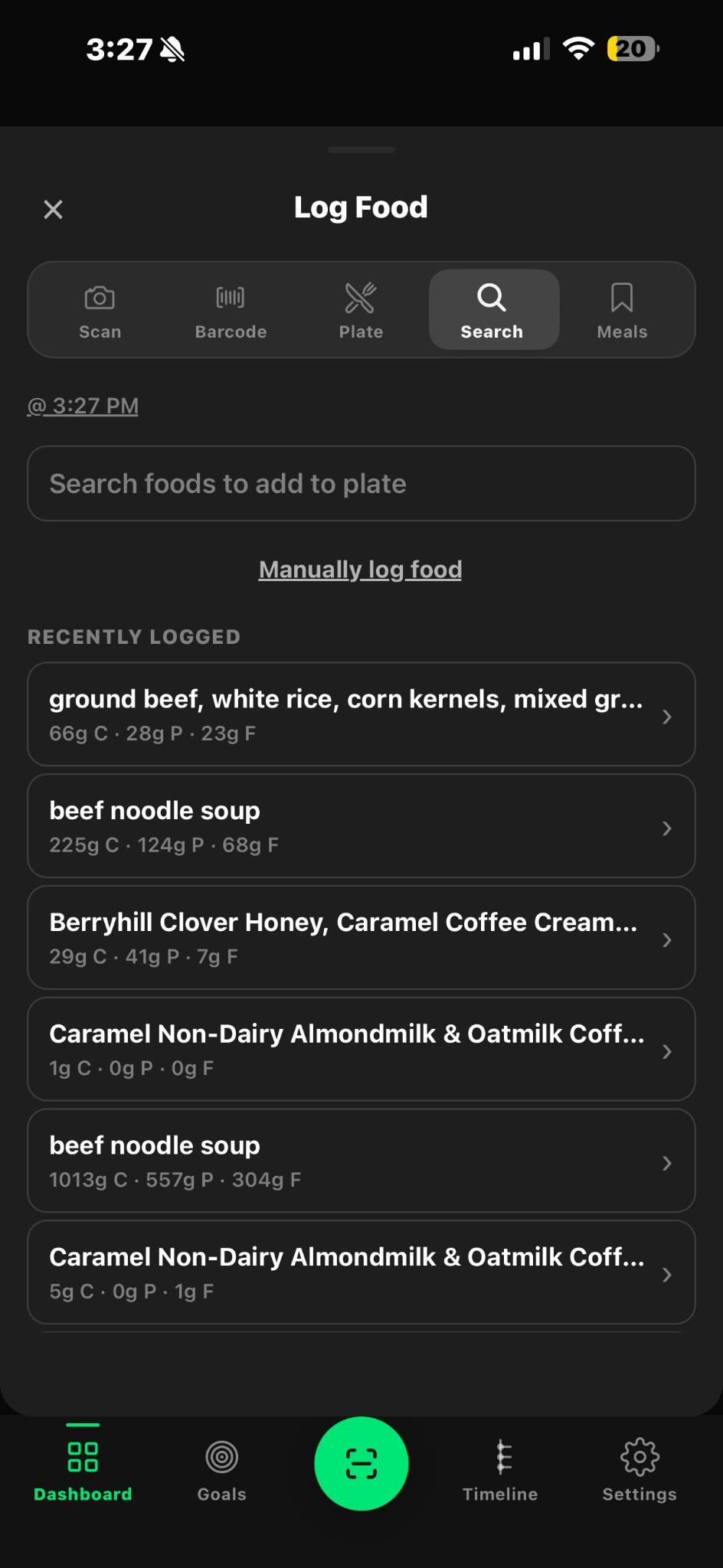
Tap the large round green button at the bottom center of the screen. The “Log Food” screen opens, and you can pick whichever way is easiest for you.
- Scan: take a photo of your plate.
- Barcode: point the camera at the barcode on a package.
- Search: type the name of a food.
- Meals: pick a meal you’ve saved before.
- Manually log food: type in the numbers yourself.
What’s the quickest way to log something I eat often?
Look under “Recently logged” on the Log Food screen. Tap a past meal to log it again in one step, without typing anything.
What do the letters C, P, and F mean?
They are short for Carbs, Protein, and Fat, the three main parts of food. For example, “66g C · 28g P · 23g F” means 66 grams of carbs, 28 grams of protein, and 23 grams of fat.
I forgot to log a meal. Can I add it later?
Yes. On the Log Food screen, tap the time shown under the buttons (for example “@ 3:27 PM”) and change it to when you actually ate.
I made a mistake. How do I fix it?
Go to the Timeline tab at the bottom of the screen. Find the meal and tap the small pencil icon on the right to edit it.
Understanding your readiness
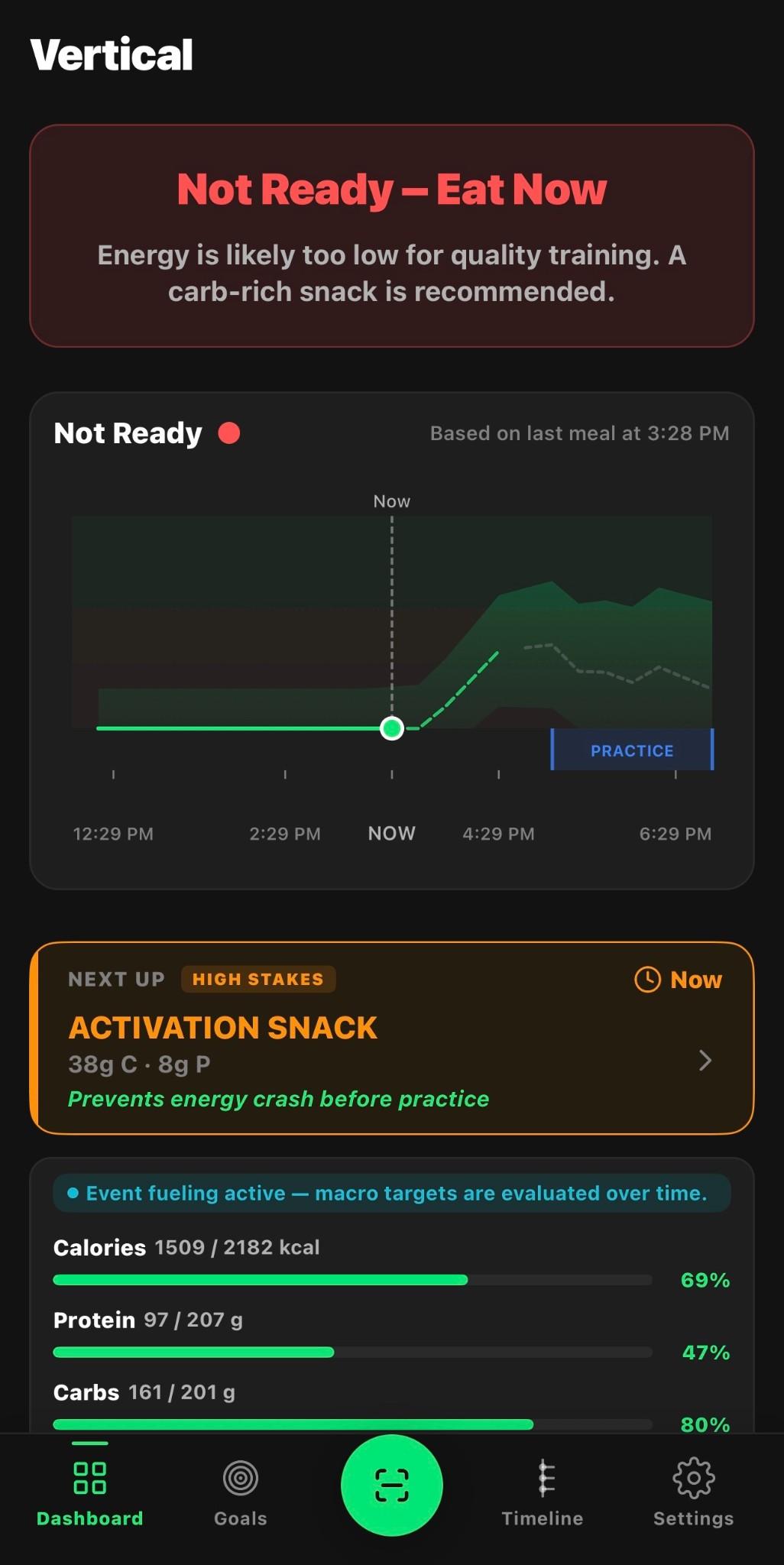
What does “Not Ready – Eat Now” mean?
It means the app thinks your energy is likely to be too low for a good workout, based on what you’ve logged. The app will suggest a snack that can help. It is an estimate, not a medical reading.
How do I read the chart on the home screen?
The line shows your estimated energy over the day. The dotted line labeled “Now” marks the current time. The blue box shows when your next practice or workout starts. You want the line to be rising into the green area by the time that box begins.
What is the orange “Next Up” box?
It is the app’s suggestion for what to eat next and when. For example, “Activation Snack, 38g C · 8g P, Now” means a small snack with about 38 grams of carbs and 8 grams of protein, eaten right away.
Why does readiness depend on logging?
Vertical can only estimate your energy from the meals you log. If you skip logging, the app has less to go on, so its advice will be less accurate.
Your daily timeline
What is the Timeline?
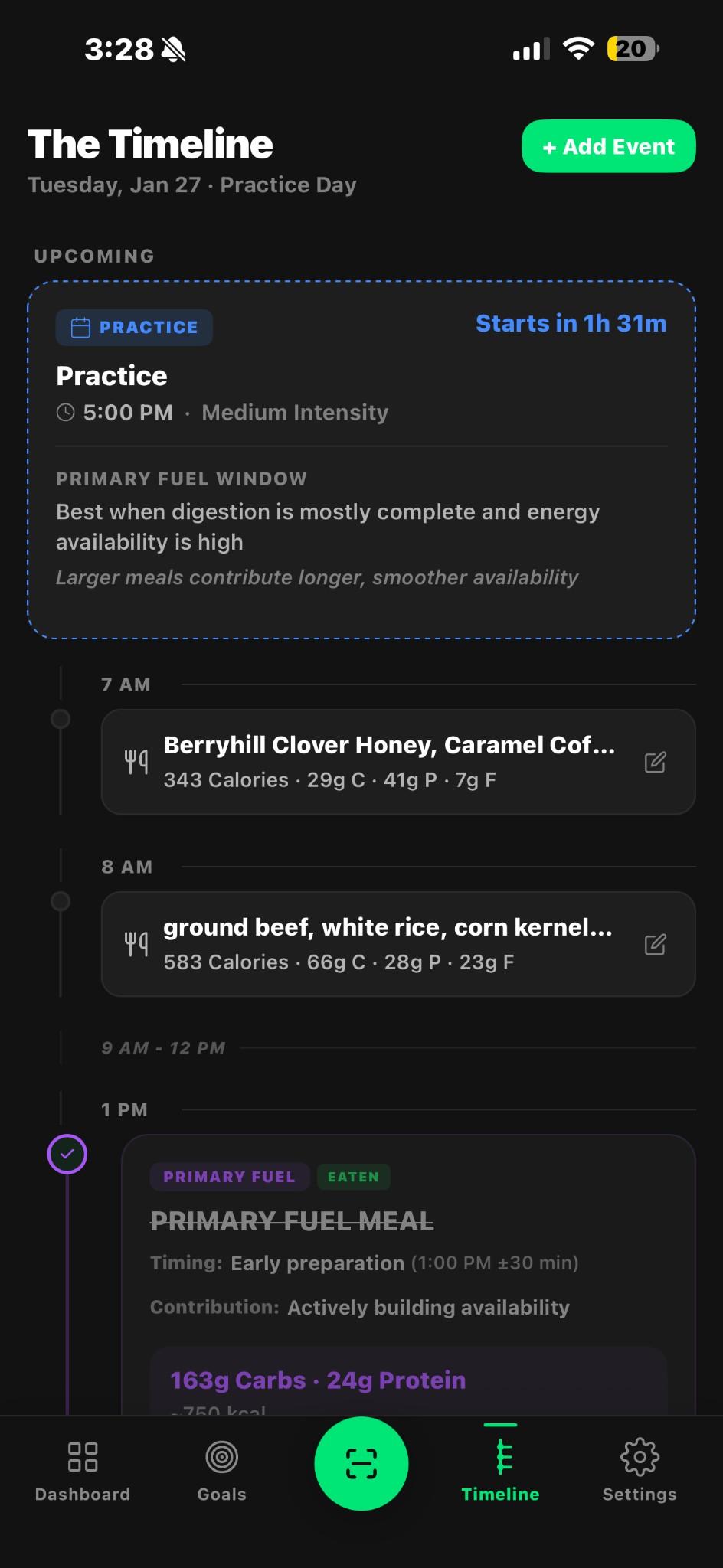
The Timeline is your day in order, from morning to night. It shows your upcoming workouts or practices at the top and every meal you’ve logged underneath, by time.
How do I add a workout or practice?
Open the Timeline tab and tap the green “+ Add Event” button in the top right. Choose the type, the time, and how hard it will be. Your coach can also add team events for you.
What is a “Primary Fuel Window”?
It is the best time to eat a larger meal before your workout, so your food is digested and your energy is high when you start.
Setting your goals
How do I set my goal?
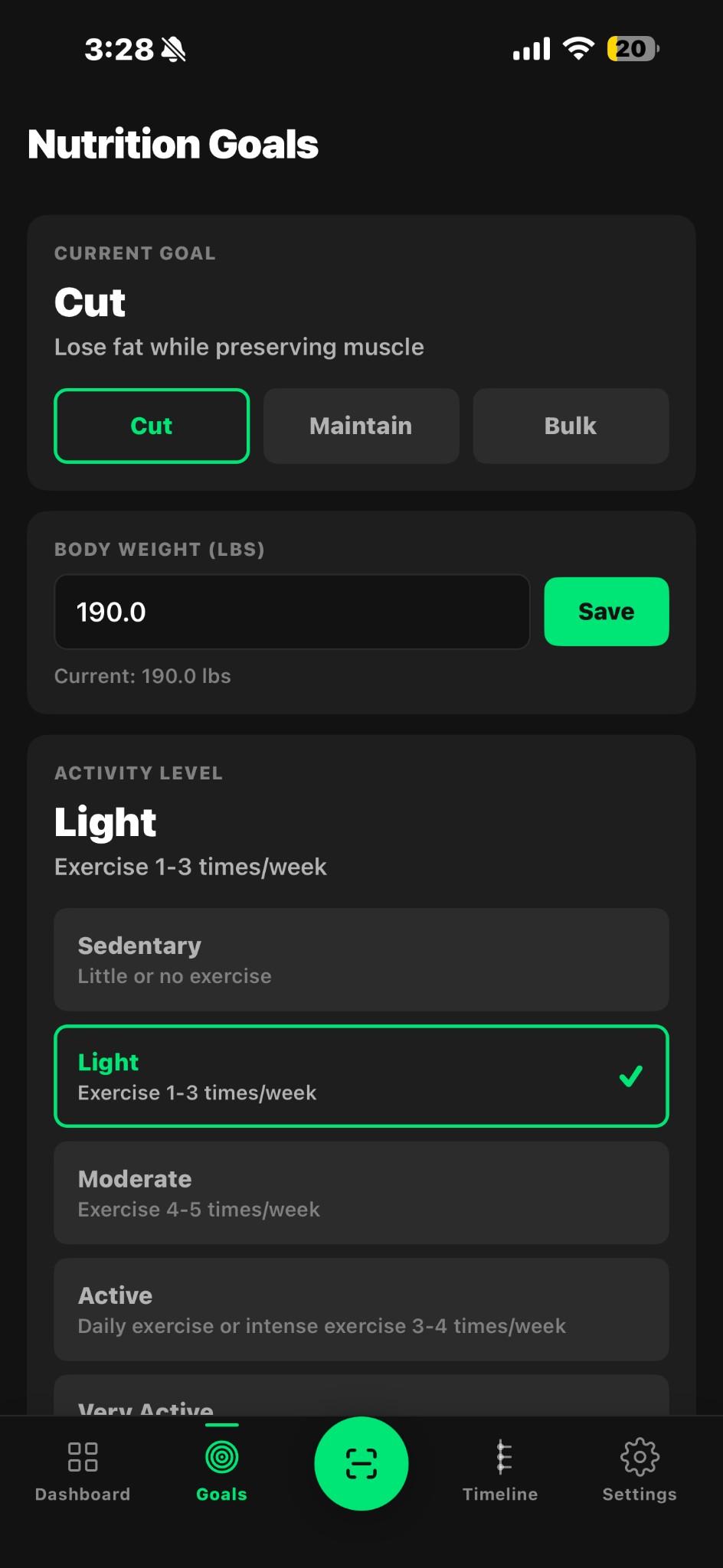
Tap “Goals” at the bottom of the screen. Choose Cut (lose fat while keeping muscle), Maintain (stay where you are), or Bulk (gain weight and muscle).
How do I update my weight?
On the Goals screen, tap the Body Weight box, type your current weight in pounds, and tap the green “Save” button.
Which activity level should I choose?
Pick the one that best matches a normal week. Sedentary means little or no exercise. Light means 1–3 workouts a week. Moderate means 4–5. Active means daily exercise or hard training 3–4 times a week. If you’re unsure, choose the lower option. You can change it at any time.
Your coach and your privacy
What can my coach see?
If you joined with a coach’s invite code, your coach sees a team screen like the one shown here. It lists each person’s readiness and how long ago they last logged food, so they can check in before practice.
Do you sell my information?
No. We do not sell your personal data. You can read the full details in our Privacy Policy.
Read the Privacy PolicyHow do I delete my account?
Visit our Account Deletion page and follow the steps there, or email us and we will take care of it for you.
Go to Account Deletion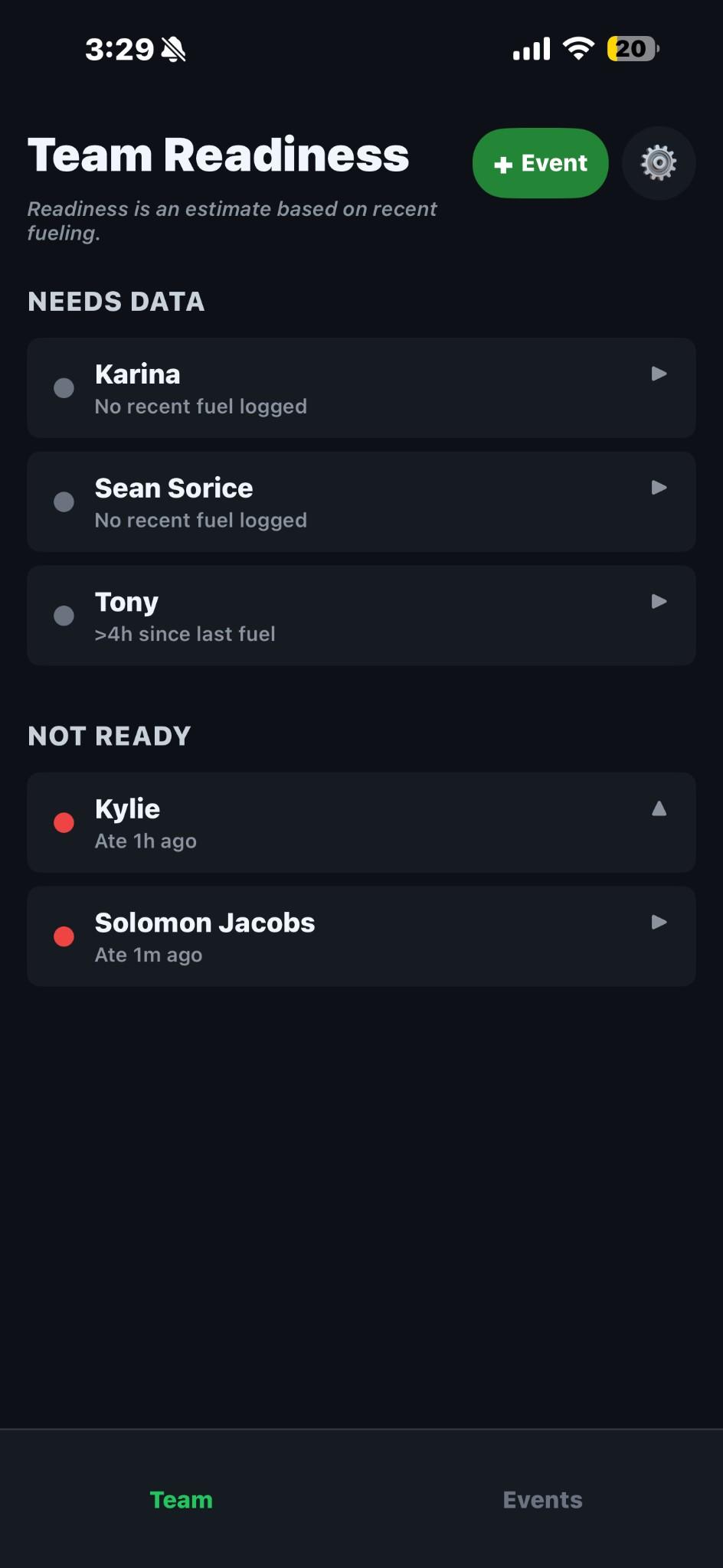
Health, comfort, and getting help
Is Vertical medical advice?
No. Vertical gives general fueling guidance for exercise. It does not diagnose or treat any condition. If you have diabetes, heart, kidney, or digestive conditions, take medication that affects appetite or blood sugar, or follow a diet from your doctor, talk to your doctor before changing how you eat.
The text is too small to read. What can I do?
On your iPhone, open Settings, then Accessibility, then Zoom, and turn Zoom on. You can then double-tap the screen with three fingers to magnify anything, including Vertical.
I’m stuck. How do I get help from a person?
Email us at solomon@verticalco.io or use the form on our Support page. A real person reads every message, and we usually reply within one business day. It helps to include the email you signed up with and a screenshot if you can.
Go to the Support pageStill need help?
We’re happy to walk you through anything, step by step.